
Minimum requirements
The SDK is compatible with a minimum version of Xcode 13 using iOS 13. Don't try the SDK with a simulator.
First, you need to download our MapSDK to integrate it in your project :
https://fnoproduction.blob.core.windows.net/sdk/ios/1.5.28/20230208_FNOSDK_1.5.28.zip
In order to help you with the SDK, you will find two integrations examples with sources codes :
https://fnoproduction.blob.core.windows.net/sdk/ios/1.5.27/demos/20221219_ProjectDemo_iOS.zip
Ask us a token in order to try our demo through this email : business@findnorder.com
1 - Copy libFNOSDK.a, FNOSDK.swiftmodule and UnityFramework.framework files and import them into your iOS project.
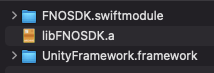
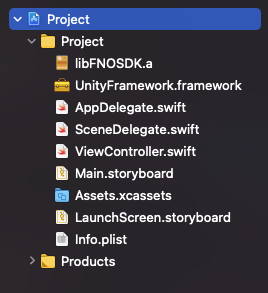
2 - Update "Import Paths" value to the folder where is stocked your libFNOSDK.a in your Target --> Build Settings --> Swift Compiler - Search Paths

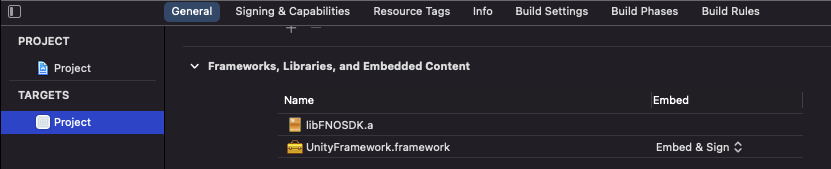
3 - Change state for UnityFramework.framework to "Embed & Sign" in your Target --> General --> Frameworks, Libraries, and Embedded Content
4 - In your ViewController, add FNOSDK initialization before creating your Map. Use API Url and Token provided by FNO.
